Periodic Table
for Gemini.
An open-source Chrome extension that replaces the standard model dropdown on gemini.google.com with the viral 118-element Periodic Table—switching your real active Gemini model and Thinking Level on the fly.
Try the 118-Element Selector Live
Click or hover over 1 H (Hydrogen), 6 C (Carbon), or 18 Ar (Argon) below to test Thinking Level switching right in your browser.
Where should we start?
Captured in Action
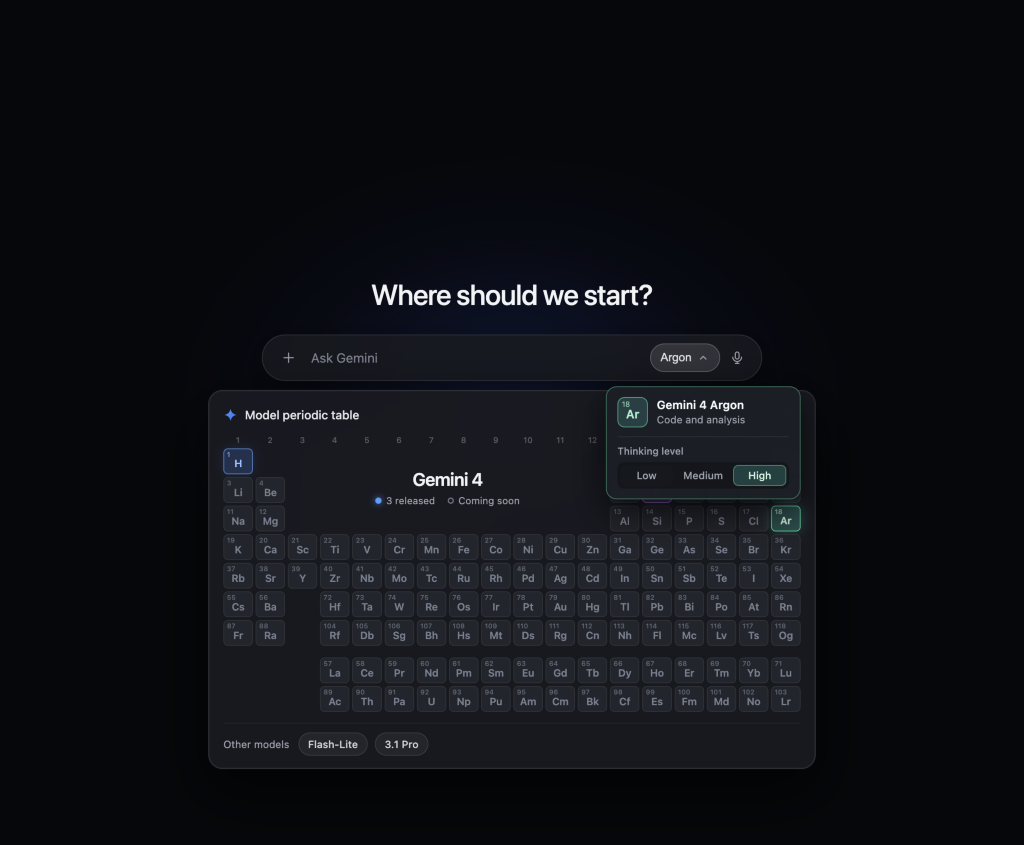
Gemini 4 Argon — Code & Analysis
Selecting 18 Ar (Argon) switches your live Gemini session to 4 Argon and exposes real-time Thinking Level controls (Low, Medium, High).
Not Just a Mockup. Built for Live Gemini DOM.
Designed with precision DOM synchronization so every click in the Periodic Table drives Google Gemini's underlying model router and Thinking Level state in real time.
Real-Time Native Model Switching
Hooks directly into [data-test-id="bard-mode-menu-button"] and drives gem-menu items invisibly in the background—genuinely switching between 4 Hydrogen, 4 Argon, 4 Carbon, 3.5 Flash-Lite, and 3.1 Pro.
Precision Thinking Level Sync
Reads and switches Gemini's native thinking_level options (Low, Medium, High) by matching pure .label nodes and live button state across English and Chinese locales.
Dual Responsive Breakpoint Engine
Automatically adapts across Gemini's 960px responsive breakpoint—supporting both desktop nested popover="manual" submenus and mobile top-header inline .expand-content accordions.
Zero-Misclick Bridge & 100% Privacy
Features a continuous hit-area hover bridge and a 220ms hover-intent guard so moving toward Thinking Level pills never triggers adjacent elements. Runs 100% locally with zero telemetry.
100% Open Source. Inspect Every Line.
Both the Chrome Extension (Extension/) and this Next.js showcase website (web/) are open-source under the MIT License on GitHub.
git clone https://github.com/HenryNitrogen/gemini-periodic-table.gitInstall in 30 Seconds
Download or Clone
Download periodic-table-for-gemini.zip and unzip it, or clone the repository from GitHub and locate the Extension/ directory.
Load Unpacked in Chrome
Open chrome://extensions/, toggle on Developer mode in the top-right corner, and click Load unpacked to select the Extension/ folder.
Open Google Gemini
Visit gemini.google.com and click the model selector button in the prompt bar to launch the Periodic Table.